
Feature
A couple photo widget for your home and lock screen
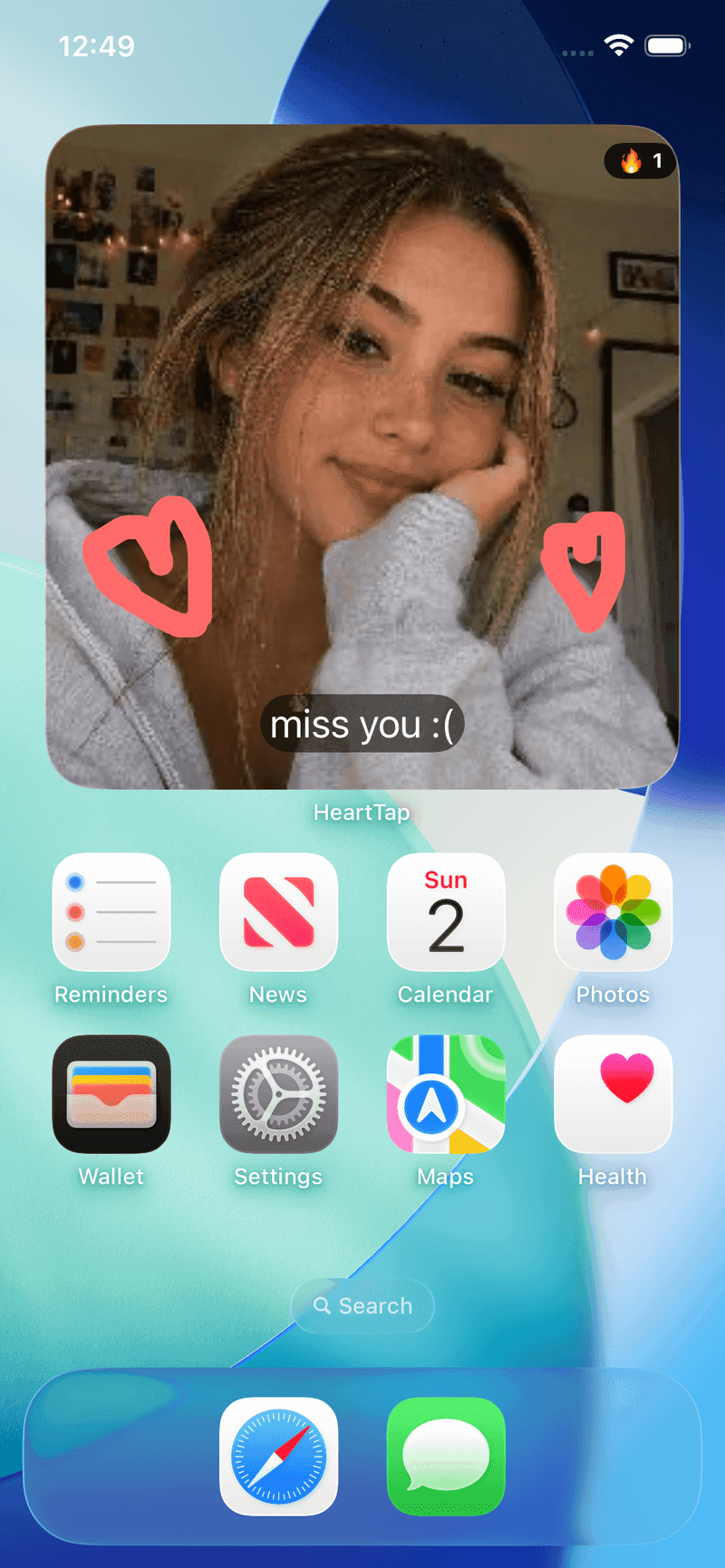
The status widget is the part of HeartTap that does the work. Everything else in the app is something you go and do; the widget is the only feature that reaches your partner without either of you deciding to open anything.
Post a photo, a short video, a drawing or simply a colour with a few words on it. A silent push wakes their phone, the widget redraws, and the next time they pick up their phone you are there. Nothing is owed in response, which is the entire difference between this and a message.
Four kinds of status
A photo, a short video, a hand-drawn note, or a plain colour with a caption. The colour option exists because there are days when a photo is more effort than you have, and something is still better than nothing.
Home screen and lock screen
Widgets in several sizes on both surfaces, on both platforms. Most couples run a large photo widget on the home screen and a small one on the lock screen, so the lock screen tells you there is something new and the home screen shows you what.
Updates without anyone opening the app
The widget refreshes in the background when something new arrives. It works even with notifications switched off, which matters more than it sounds, because a lot of people mute everything and still want to see their partner.
Captions and streaks
Every status can carry a short caption, and the widget shows your current streak, so you can see at a glance how long you have both kept it going.
It lands in your timeline too
Nothing disappears. Everything you post joins the shared timeline where it can be replied to and reacted to, so the widget is a surface rather than a separate silo.
Go further
Frequently asked questions
How fast does the widget update?
Usually within seconds of posting. A silent push tells the receiving phone to refresh, so it does not wait for a scheduled interval. On Android, battery optimisation can delay it, which is why setting the app to Unrestricted is worth doing.
Does it work with notifications turned off?
Yes. Widget refresh and notification delivery are separate mechanisms, so someone who mutes everything still gets an up to date widget. For a lot of people this is the main appeal.
Can I put a video on a widget?
Yes. Short videos are supported alongside photos, drawings and plain colours. How the video presents itself depends on what the platform allows a widget to render, since neither iOS nor Android lets a widget play arbitrary video continuously.
What widget sizes are there?
Small, medium and large on the home screen, plus lock screen widgets. Android additionally lets you resize on a grid. A large widget is worth it for photos, since smaller sizes crop faces tightly.
Put them on your home screen tonight
Free to download on iPhone and Android. Link with your partner in under a minute, then send your first photo, drawing or check-in.